

Can a direct apartment booking really be fee-free, or does the lower nightly rate only tell part of the story? If you’re searching for “book apartment direct no fees”, look beyond the headline rate. A separate booking fee may not apply, while other costs or booking terms can still affect your decision.
Booking through an apartment’s own website can make the reservation process more straightforward, but it doesn’t automatically mean the overall stay costs less or that every charge is included in the first price you see. The full amount displayed for your dates and guests is the useful figure to compare.
This guide explains what “no booking fees” can mean, what it doesn’t promise, and how to compare the total and terms before paying. You’ll learn to use the same dates, guest numbers and stay length for each option, then review the details that matter before booking. You can also explore Home Vacay’s self-contained apartments for business or leisure and review the details shown for your chosen stay.
Key Takeaways
- “No booking fees” doesn’t always mean there are no other charges. Check the displayed total and its breakdown.
- For a fair comparison, use the same dates, guest numbers, apartment type and length of stay.
- When you book an apartment direct with no fees, compare the full payable total and booking terms, not just the nightly rate.
- Use a pre-payment checklist to confirm your stay details and review the total before completing a booking.
- Home Vacay offers short-term self-contained apartments for business and leisure stays, with direct booking through its website.
Book an Apartment Direct with No Fees: What the Phrase Really Means
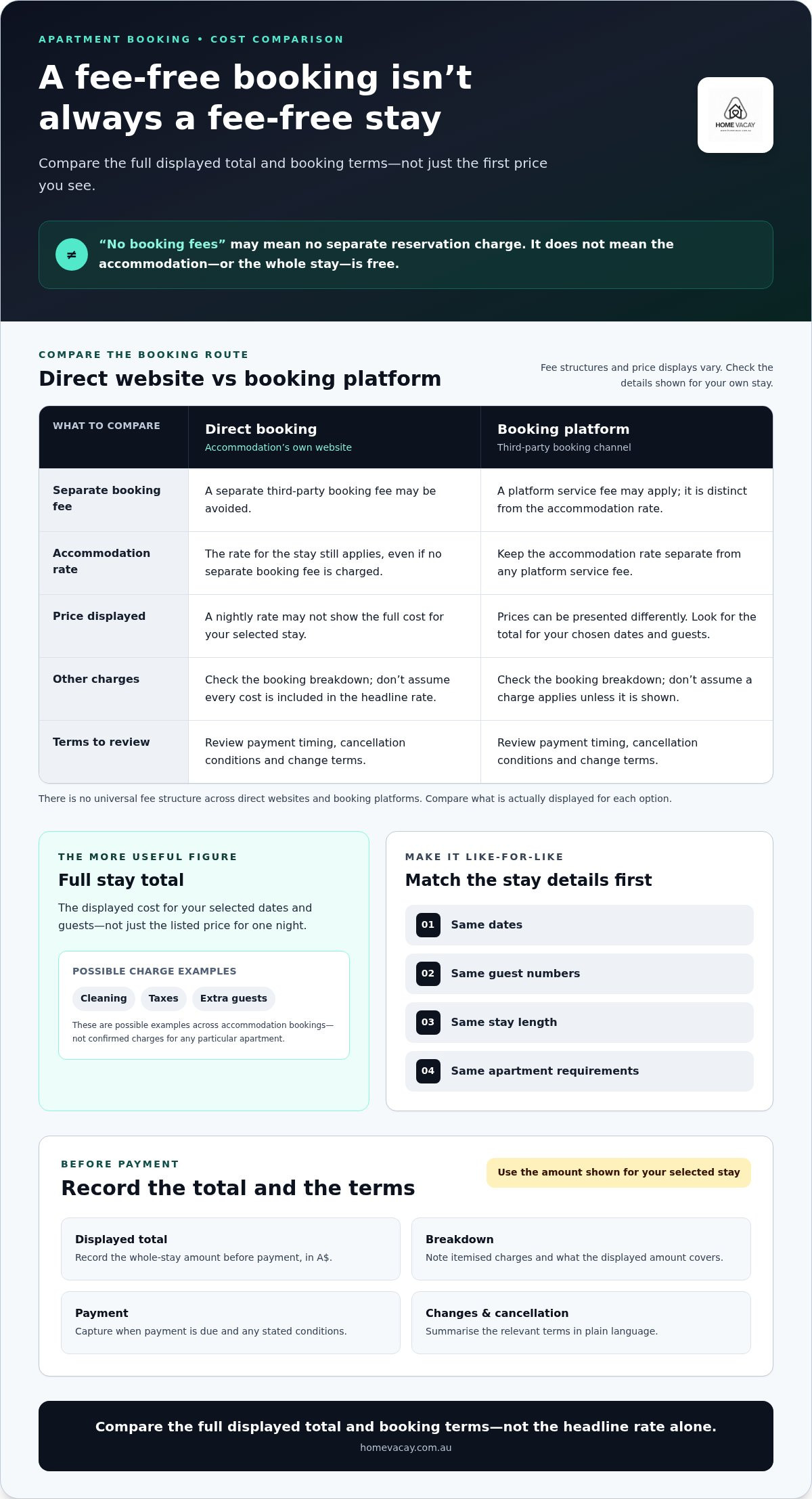
“No booking fees” usually means a separate charge for making the reservation may not apply. It doesn’t mean the accommodation or the whole stay is free. The apartment rate still applies, and other costs may appear in the booking details. Keep the reservation fee and accommodation rate separate when comparing options: one relates to the booking process, the other to the stay itself.
What can “no booking fees” mean?
The phrase may mean you avoid a separate third-party booking fee by reserving through an accommodation business’s own website. Booking channels can present prices differently, though. A platform service fee, where applicable, is distinct from the accommodation rate. There is no universal fee structure across direct websites and booking platforms, so the phrase alone doesn’t tell you the full amount you’ll pay.
Short-term apartment stays sit within the broader vacation rental category, which covers different kinds of temporary accommodation. The booking route is only one part of the cost picture. A direct reservation may remove a separate platform charge, but that doesn’t establish that every other cost is absent or included in the headline rate.
Why the headline rate is not always the final total
A nightly rate answers, “What is the listed price for one night?” The total stay amount answers, “What is the displayed cost for these dates and guests?” The figures differ when a stay covers multiple nights or when other charges are shown during booking. Examples across accommodation bookings can include cleaning charges, taxes or extra guest charges. These are possible examples, not confirmed charges for any particular apartment.
For example, one listing might show a nightly rate while another displays a stay total. The first figure doesn’t tell you whether both prices use the same dates, guest numbers and length of stay, or whether the full amount has been calculated. Compare matching details, then use the amount displayed for your selected stay before payment as your practical reference.
If you’re searching for “book apartment direct no fees”, treat “no fees” as a specific claim about a booking charge, not a promise of a charge-free stay. Read the price breakdown and booking terms shown before completing the reservation. Don’t assume an unclear cost or condition is included simply because the headline mentions no booking fee.
Keep the decision grounded in what is displayed: the accommodation rate, any separately listed charges and the total for the stay. Then consider the booking terms alongside the price. A fee-free booking claim and a zero-cost stay are not the same thing. The full displayed total gives you a sounder basis for comparing the cost of your chosen apartment.
Compare Apartment Booking Fees by Checking the Full Stay Total
Start with a like-for-like search. Dates, guest numbers and apartment requirements can change the price, so a lower figure on one page may not represent a better deal. A fair comparison uses matching stay details and the full displayed total. Record each option’s total before payment, then consider the terms shown with it.
Which charges and terms should you compare?
Review the booking breakdown for any itemised service, cleaning, tax or payment charges. These are examples of categories that may appear in accommodation bookings, not charges that necessarily apply to every stay. Include only the costs shown in the details for the booking you’re comparing. Then read the payment schedule, cancellation conditions and change terms. These can affect how suitable an option is, even when its total looks appealing.
Keep a simple record for each option. A note on your phone or a small table is enough:
- Displayed total: Record the amount for the whole stay before payment, in A$.
- Breakdown: Note any itemised charges and what the displayed amount covers.
- Payment: Capture when payment is due and any stated payment conditions.
- Changes and cancellation: Summarise the relevant terms in plain language.
Don’t add a charge just because you’ve seen it on another booking channel. If it doesn’t appear in the details for the stay you’re comparing, don’t assume it applies. Compare the information presented rather than guessing what might be added.
How to make a like-for-like comparison
Use the same dates, guest numbers, stay length and apartment requirements for each option. Check that each result matches the type of stay you want. Then compare the full amount for the whole stay, rather than multiplying a nightly rate yourself or relying on the first price shown in search results.
Look beyond the number, too. One option may have different cancellation conditions or payment timing from another. Those differences matter if your plans could change or you need to manage payment around a particular schedule. Include flexibility and terms in your comparison, rather than treating them as fine print to consider after choosing.
For a clear record, write down each total beside its terms. If a listing shows a nightly rate first, continue through the booking steps until the amount for your selected stay is displayed. Compare that figure with the equivalent total elsewhere. This is especially useful if you’re trying to book apartment direct no fees, because choosing a direct route alone doesn’t show whether the overall option suits your budget or needs.
Home Vacay accepts direct bookings through its website. You can explore Home Vacay apartment stays and review the total and terms displayed for your selected dates before completing a booking.
Direct Booking vs a Booking Platform: Compare More Than Fees
Neither direct booking nor a platform booking is automatically the better choice. The right option depends on the stay details, displayed total, terms and how you prefer to make a reservation. A platform can be useful for browsing several listings in one place. A direct website lets you view an apartment through the accommodation business itself. Compare the details, not just the channel.
What direct booking can make simpler
Direct booking means reserving through the accommodation business’s own website rather than completing the reservation on a third-party platform. You can follow one booking journey to review your selected stay, the displayed total and the terms presented there. Home Vacay accepts direct bookings through its website for short-term self-contained stays for business and leisure travellers. Read the details shown for your chosen stay before completing the reservation.
A direct route can be appealing if you’ve already found an apartment that suits your trip. However, ease of booking doesn’t tell you whether the total is lower, and the booking terms may differ from those on a platform. Consider what information is available, how the payment and cancellation terms read, and whether the displayed amount fits your plans.
When a platform listing still needs a fair comparison
Some travellers prefer platforms because they can browse and compare different accommodation options in one place. That convenience can help you narrow down a shortlist, but it doesn’t replace checking the selected stay’s full amount and terms. A lower headline rate on a platform or direct website may not mean a lower total once you reach the booking details.
Use the same dates, guest numbers and stay requirements when comparing a platform listing with a direct option. Continue through each booking journey until the amount displayed before payment is clear. Then compare cancellation conditions, payment timing and any other terms shown. Don’t assume one channel is always cheaper, more flexible or more complete. Details can differ between listings and stays.
Convenience and loyalty benefits can matter, but weigh them separately from the cost of the apartment. If a platform offers a benefit you value, note it beside the total rather than treating it as a price reduction unless the displayed amount reflects that. Likewise, choosing to book apartment direct no fees doesn’t establish that the full stay will cost less. The total and terms remain the clearest basis for a practical comparison.
Before deciding, consider which booking route gives you the information you need. Check that the apartment and dates are right, that the total is clear, and that the terms suit your plans. A familiar platform may make browsing easier; a direct booking may take you straight to the accommodation business. Either way, decide using the complete details in front of you.
Use This Checklist Before You Book an Apartment Direct
Before paying, check that the reservation matches your plans and that you understand the amount and conditions shown. This sequence works across accommodation websites, whether you’re booking for work or a getaway. It’s also useful when you’re searching to book apartment direct no fees, because the booking route alone doesn’t tell you the full terms.
Check the apartment and booking details first
Start with the stay itself. Confirm you’ve selected the right apartment and that the dates cover your arrival and departure. Check the guest count and stay length carefully. Then read the check-in and check-out information, including any flexibility details displayed for that stay. A small input error can make the total or booking conditions unsuitable for your trip.
- Confirm the dates. Check arrival and departure dates, and make sure the number of nights matches your plans.
- Check the guest details. Verify the number of guests and any other booking details entered on the page.
- Review the apartment choice. Make sure you’ve selected the apartment you intend to book, with the details that matter for your stay.
- Read the arrival information. Review the check-in and check-out details shown, along with any stated flexibility for those times.
- Check the full stay amount. Find the total displayed before payment. Read any itemised charges and note what the amount covers.
Review the total and terms before paying
Once the stay details are right, check the payment and booking conditions. Look for the full amount shown before you pay, rather than relying on a nightly rate. Read the payment timing, cancellation conditions and change terms. These details help you understand both the cost and what may happen if your plans shift. Don’t assume a charge applies unless it appears in the booking details.
Pause if the total or a condition isn’t clear on the page. Recheck the selected dates and guest count, then review the displayed breakdown and terms. This helps prevent a mismatch between the stay you meant to reserve and the details submitted for payment.
Before payment, confirm the stay details, full displayed total and booking terms. After completing a reservation, save the booking confirmation and the terms shown at the time. Keeping them together gives you a handy reference for the dates, amount and conditions you agreed to.
Home Vacay accepts direct bookings through its website for short-term apartment stays. Use this checklist as you view Home Vacay apartments and booking details, then review the total and terms shown for your selected stay before completing payment.
Book an Apartment Direct with Home Vacay
Home Vacay offers short-term, self-contained apartments for business and leisure stays. If you’re looking for a place to settle in during a work trip or a break, browse apartment options and book directly through the Home Vacay website. The booking details shown for your selected stay help you understand the dates, total and terms before you decide.
A straightforward way to explore Home Vacay stays
Booking through the Home Vacay website gives you a direct way to view stay information and follow the reservation process. Choose an apartment that suits your plans, then read the details displayed for that option. Flexible check-in and check-out options are available, so include the information shown for your stay when planning your arrival and departure.
Direct booking is a way to make a reservation, not a promise that the stay has no fees or will cost less than another channel. If you’re searching for how to book apartment direct no fees, focus on the selected stay’s displayed amount and booking terms. That gives you a clearer basis for deciding whether the apartment works for your trip.
Your next step: choose a stay and review the details
Start with your travel plans. Consider whether you’re travelling for work or leisure, choose an apartment that fits, and enter the dates and guest details for your stay. Review the information presented as you move through the booking journey. Check the displayed total and read the terms before completing payment, so you understand what applies to the reservation.
Taking care at this stage helps you make a more settled booking decision. The details are specific to the stay you select, so base your choice on what is displayed for those dates and guests. If you’re comparing accommodation options, keep a note of each total and its terms rather than relying on a headline rate or an assumption about what direct booking includes.
Home Vacay provides a straightforward way to explore short-term apartment stays and make a direct booking online. Browse the available stays for your plans, then check the displayed booking details before you pay. Choose the option that suits your trip and proceed when the dates, total and terms are clear.
Make Your Next Stay Easier to Plan
A clear booking decision starts with knowing what matters most for your trip. Set your priorities before you choose: the dates that work, the apartment that suits your plans, and the booking terms you’re comfortable with. Before paying, make sure the details on screen match what you intended to reserve.
If you’re looking to book apartment direct no fees, focus on the actual stay rather than the promise in a headline. Direct booking can be a simple way to make a reservation, but the displayed total and terms help you decide whether the option is right for you. Take your time and use the information in front of you.
Home Vacay offers short-term apartment stays for work or leisure. Browse the available options, enter your travel details, and review the booking information before paying. Browse Home Vacay apartments and book direct when you’re ready to find a stay that fits your plans.
Frequently Asked Questions
Is booking an apartment direct always fee-free?
No. Booking directly may avoid a separate third-party reservation fee, but it doesn’t guarantee a charge-free stay. The accommodation rate and any charges shown for that booking determine the displayed amount. Before paying, check whether the total changes as you enter your dates and guest details. Read the payment and cancellation conditions too, so you understand the reservation you’re making.
What does “no booking fees” mean when booking accommodation?
“No booking fees” usually refers to a separate charge for making a reservation, though the exact meaning depends on the booking channel or offer. It doesn’t mean the accommodation itself is free or that other charges can’t apply. Check the booking breakdown for the selected stay. Compare full stay totals, not a fee-free claim on one page with a nightly rate on another.
Can booking an apartment direct save money?
It’s worth comparing, but direct booking isn’t automatically cheaper. For example, one option may have a lower nightly rate but different payment or cancellation conditions, so the headline alone won’t show which suits you better. To book apartment direct no fees with confidence, compare identical stay details and assess the displayed total alongside the terms. Choose the option that fits your budget and plans.
How do I check the full cost before booking an apartment?
Enter the exact dates and guest details for your trip, then continue until the booking page displays the amount for that stay. Check whether the total changes after you select an apartment or enter payment details, and note any itemised charges shown. If your plans may shift, pay particular attention to the change and cancellation conditions before proceeding.
Is it better to book direct or use an accommodation platform?
Neither route is best for every traveller. A platform may suit you if you want to browse several options together, while a direct website takes you through the accommodation business’s own booking process. Consider which details you need to make a decision, such as payment timing or cancellation conditions. Then compare those details and the full amount for the same stay before choosing.
What if a booking platform shows a lower apartment rate?
Check that the platform and direct option match in dates, guest numbers, apartment choice and stay length. A different departure date or guest count can make the rates misleading. Continue until the displayed total for each option is clear, then compare what the booking details show. If the totals differ, consider the terms as well. A lower starting rate alone doesn’t establish the better overall choice.


