

The fastest advertised plan isn’t always the best fit for a week away. Finding short-term rentals with good Wi-Fi starts with confirming that internet is included, checking whether the property is nbn ready and matching the connection to your needs. Your choice also depends on Wi-Fi coverage throughout the home and how many devices you’ll use.
A comfortable stay needs more than a connection that works in one corner. Video calls, streaming and everyday browsing can compete for bandwidth, especially when several people are online at once. A few checks before booking can help you avoid surprises after arrival.
This guide explains how to compare Australian short stays, check nbn availability and assess connection options for a weekly rental. You’ll learn which details matter for work and leisure, from internet access in the listing to the devices sharing the connection. Knowing what you need makes it easier to choose a stay that feels simple to settle into.
Key Takeaways
- Match internet speed and bandwidth to the people and devices sharing the connection, not just the tasks you expect to do online.
- Compare weekly stays by checking whether internet is included and whether the listing suits your household and trip.
- Confirm nbn readiness for the rental address so you know what connection may be available during your stay.
- Weigh up short-term internet plans, equipment and Wi-Fi coverage to find a practical option for the length of your visit.
1. What are the best short term rentals in Australia?
The best weekly stay suits your work, travel plans and internet needs. Start with listings that state whether Wi-Fi or a wired connection is available. Treat “Wi-Fi” as an amenity, not a promise about speed. Check the description for connection details, access instructions and any usage limits.
Choose a connection based on your household’s devices and activities. Internet speed measures how quickly data travels between a device and the internet in both directions. Video calls, streaming and file uploads all use bandwidth. A solo traveller browsing and emailing has different needs from a family streaming while someone works remotely. Count the phones, laptops, tablets and televisions likely to connect, then consider how everyone will use them at the same time.
Prices for reliable Wi-Fi stays in Sydney, Melbourne, Brisbane and other Australian cities depend on location, dates, property size and included amenities. Compare listings for the same travel dates and guest numbers. Wi-Fi alone doesn’t show whether a stay costs more or offers a better connection.
Cancellation and refund terms depend on the policy stated for the booking. If the internet differs from the listing, save the description and record what you find, then follow the platform’s process for raising an issue. Don’t assume an automatic refund applies.
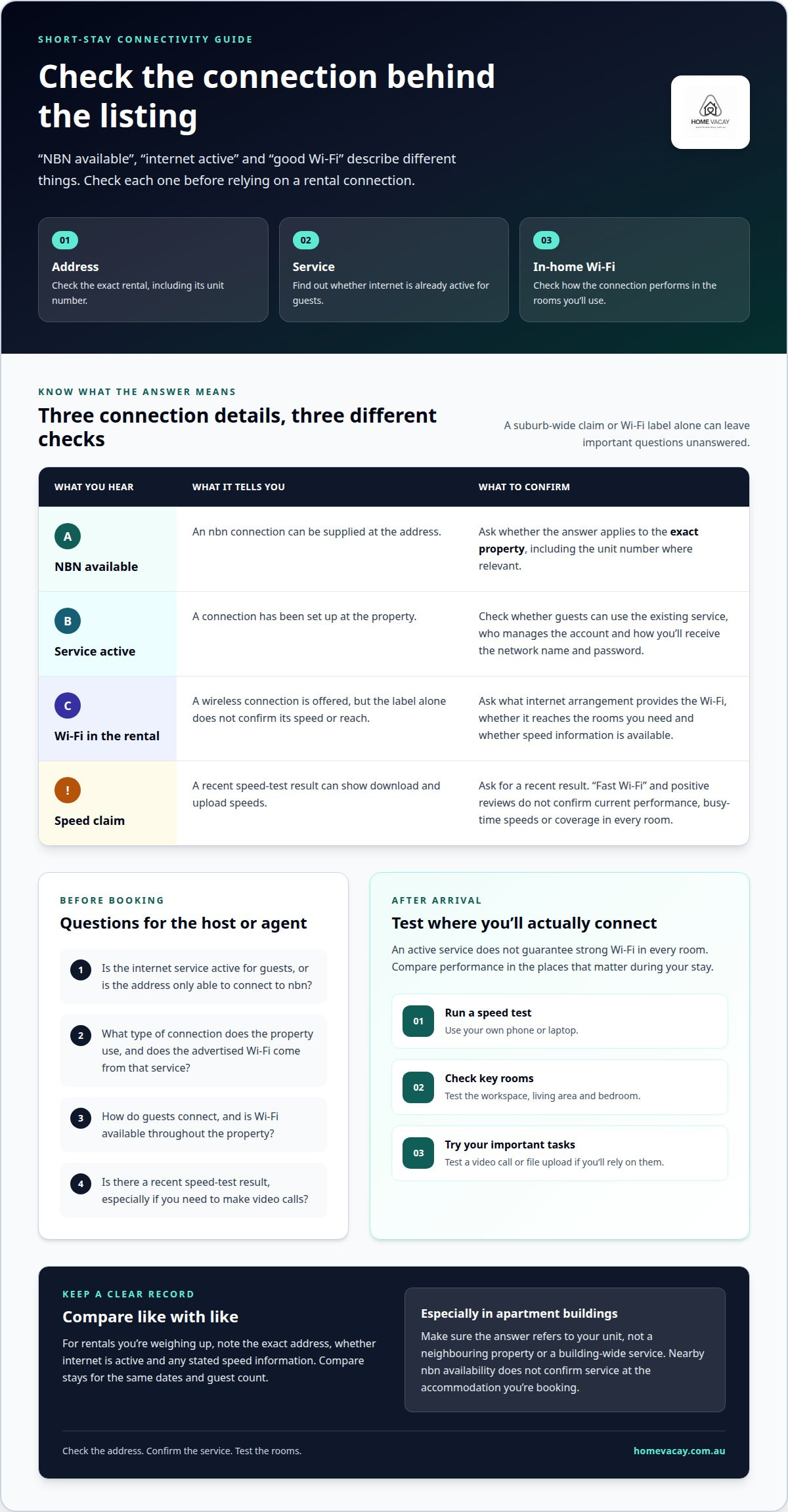
Look for a recent speed-test result showing download and upload speeds. If the listing doesn’t provide one, ask the host for it. A label such as “fast Wi-Fi” or positive guest reviews can’t confirm current speed, performance at busy times or coverage in every room. Reviews may refer to different dates, devices or parts of the property.
After arrival, run a speed test on your device in the workspace, living area and bedroom. Compare the results and try a video call or file upload if those are important during your stay. Testing different rooms can reveal dead spots a test beside the router won’t show.
2. Short-term and weekly rental listings in Australia
Weekly rentals can suit work trips, family visits and breaks that last longer than a weekend. Compare the total cost of the stay, guest capacity, location and included amenities, not just the nightly rate. Search by destination and dates, then read each listing’s internet details and cancellation terms. A property that mentions Wi-Fi may still leave questions about speed, access or coverage between rooms.
Look for listings that say whether internet is included and explain how guests connect. A clear description distinguishes Wi-Fi from mobile reception or a wired connection. It may also explain whether the connection is available throughout the property. If you need video calls, check for a suitable workspace and nearby power points. For a family, consider whether several people might stream, study or browse at once.
South Australia offers a range of short-stay settings, from Adelaide suburbs to regional destinations. For example, a four-bedroom home near Marion and Flinders in Seacombe Gardens accommodates 8 guests. That capacity makes the number of connected devices especially relevant. A large group may use phones, laptops and televisions simultaneously, so a listing’s internet description matters alongside bedrooms and shared living space.
Mobile coverage and rental Wi-Fi are separate considerations. A carrier’s coverage map can help you assess the area, but signal inside a building varies with its location and construction. Check the map for the exact suburb, then consider whether you need mobile data as a backup. Advertised speeds can also differ from the experience on your device, particularly when several people share a connection. For a weekly stay, compare listings for the same dates and guest count, and favour descriptions that explain internet access rather than relying on a Wi-Fi icon alone.
3. Checking nbn availability at a rental
Before booking, ask the real estate agent or landlord whether the rental is nbn ready. Give them the property’s exact address, including the unit number where relevant. An address-level answer is more useful than a suburb-wide claim because nearby homes can have different connection arrangements. Ask whether internet is already active for guests, or whether the address only has access to an nbn connection.
These details describe different things. Availability means an nbn connection can be supplied at the address. An active service means a connection has been set up. Neither tells you the speed you’ll experience inside the rental. Ask what type of connection the property uses and whether the advertised Wi-Fi comes from that service. This distinguishes nbn access from mobile data or another internet arrangement.
For a weekly stay, clarify who manages the internet account and whether guests can use the existing service. Ask how you’ll receive the Wi-Fi network name and password, and whether the connection is intended for everyday guest use. If you need reliable video calls, explain that directly. A general “internet available” response doesn’t show whether the setup suits work, streaming or several devices.
Keep the answers with the listing details. Note the exact address, whether the service is active and any stated speed information. Compare these points across rentals for the same dates and guest count. If the rental is in an apartment building, make sure the answer refers to your unit, not a neighbouring property or building-wide service. Checking the address helps distinguish nbn availability nearby from service at the accommodation you’re booking.
After you arrive, compare the host’s connection details with your device’s performance in the rooms you’ll use. A connection can be active but still have weak Wi-Fi in a bedroom or workspace. Testing with your laptop or phone reveals the difference before you rely on it for a work call or streamed programme.
4. Choosing connectivity for short stays
For a week away, start with the rental’s existing connection. Outdated modems can affect speed, and several devices sharing Wi-Fi can slow performance. A faster plan may suit a household with simultaneous video calls and streaming, while cheaper plans are usually slower. The right fit depends on the activities and devices using the connection.
Wi-Fi coverage matters as much as the plan. A single router may not reach every room in a larger rental or serve several users well. A Wi-Fi booster can help with dead spots. If the modem or router is outdated, upgrading the equipment may improve the experience. For work calls, test the connection in the room you’ll use, not only beside the router.
If the rental’s Wi-Fi is poor, alternatives include working from a coworking space or using mobile data through a hotspot. Some providers recommend booking at least 7 days ahead; delivery may take 1-3 business days.
When finding short-term rentals with good Wi-Fi, a no-lock-in internet plan can offer flexibility to change, cancel or restart service. Check the terms for set-up and early termination fees before signing up. Some providers discount multiple services, but savings and conditions vary. Use the rental’s connection for everyday browsing and keep a hotspot or pocket Wi-Fi as a backup where mobile coverage is suitable.
The key to finding short term rentals with good wifi is choosing connectivity that fits the length and rhythm of your stay. If you’re planning an Australian getaway, explore short-stay options with Home Vacay for a comfortable base between work and downtime.
Home Vacay
Home Vacay offers short-term apartments for business and leisure stays, including options in Canberra City, Coombs and Braddon. If Canberra suits your plans, consider Capitol Apartments in Canberra City, Peaceful Coombs Apartment for Families or Luxury Apartment in Braddon Precinct. Each offers a starting point for comparing location, layout and the needs of your trip.
If internet matters during your stay, use the checks in this guide to assess the connection details for your chosen rental. Consider where you’ll work or relax, how many devices you’ll use and whether you need a backup connection. Choose accommodation that fits both your plans and practical needs.
Contact Home Vacay to discuss your stay.
Plan a stay that fits your week
A good weekly stay should support how you’ll spend each day. Before booking, picture a typical morning, work session or family evening. Decide which online tasks need a stable connection and which can wait. That helps you choose accommodation around your routine instead of adapting your week to the property.
It’s useful to have a simple fallback for essential tasks. Keep important documents available offline and save key booking details on your device. If a video call or deadline matters, plan where you could work if the connection is interrupted. These small preparations can help you feel more settled.
A considered approach to finding short term rentals with good wifi leaves room for both practical needs and time away. Home Vacay offers Canberra stays for different kinds of visits, from business trips to family breaks. Choose the place that suits your plans, then contact Home Vacay about your stay. Your next week away can start with a little more confidence.
Frequently Asked Questions
So, what should you pick?
Choose a stay that fits your routine and has clear connection details. For a work trip, prioritise a suitable place for calls and enough bandwidth for your usual tasks. For a family break, consider how everyone will share the connection. Compare the full listing, guest capacity and booking terms rather than choosing on an internet label alone.
What are the best short-term rentals in Australia?
The best option suits your dates, group and reason for travelling. A solo business guest may value a quiet workspace, while a family might need room for everyone to use their devices. For a weekly stay, assess the layout as well as the listing details. Think through a typical day, including where you’ll work, relax and connect online.
Which short-term rental platforms in Australia let you filter for Wi-Fi or high-speed internet?
Short-stay platforms may have amenity filters for Wi-Fi, but filter names and options vary. Use the platform’s amenities search to narrow the results, then read each listing carefully. Search terms such as “internet” or “Wi-Fi” can help you find descriptions, but they don’t establish connection speed. Treat a filter as a starting point, not a measure of performance.
What internet speeds are suitable for working remotely or video calls in a short-term rental?
There isn’t one speed that suits every remote worker. A video call needs a steady connection in both directions, while sending large files places more demand on upload speed. Consider how many people will be online at once and what they’ll do. For example, simultaneous calls and streaming need more capacity than checking email alone. A measured result is more useful than a vague speed label.
What questions should you ask a host about Wi-Fi reliability, data limits and backup internet?
Ask whether the connection has a data limit, whether guests share it with others and what backup is available during an outage. If you rely on video calls, ask whether the connection has been used successfully for them. Also ask where the router is and whether the network reaches your intended workspace. These answers help you understand how the setup fits your stay.
Which Australian cities and suburbs have the best fixed broadband and mobile coverage for short stays?
No city or suburb guarantees the best connection at every address. Fixed broadband availability and mobile reception can vary between nearby properties, and building layout can affect indoor signal. Compare connectivity at the specific rental address, not just across the wider area. If mobile data is important as a backup, check your carrier’s coverage and test reception inside the accommodation after arrival.


