

You find a short-stay rental that looks just right. The photos are inviting, the host replies quickly and the dates fit your plans. Then a message asks you to pay outside the booking platform. A careful check is at the heart of avoiding short term rental scams online, even when a listing looks genuine at first glance.
Pause before sharing personal details or sending money. Fake listings, copied host profiles and pressure to use an unfamiliar payment method can put your booking and funds at risk. A consistent check of the listing, host and payment request can help you decide whether the details add up.
This guide explains how to review a listing, check for inconsistencies and keep booking messages traceable. You’ll also learn which requests warrant caution and what to do if something feels wrong or you’ve already paid. A clear process helps you plan your stay with greater confidence.
Key Takeaways
- Check the property details, then compare the listing, photos and host information for inconsistencies.
- A request to pay outside the original platform or official booking path deserves extra scrutiny.
- Avoiding short term rental scams online means keeping booking messages, confirmations and payment records together.
- Use a checklist before booking, after confirmation and before arrival to catch concerns at each stage.
- If something feels wrong, pause payments, save the evidence and contact the relevant booking service or payment provider.
Avoiding short term rental scams online starts with recognising the warning signs
A few consistent checks can help you make a more informed booking decision. A short-term rental scam involves deception around a listing, host, booking or payment. The property may not exist, may not be available to guests, or may differ from what was advertised. Some scammers also copy genuine listings and substitute their own contact or payment details.
Copied photos, vague property details, inconsistent names and pressure to pay quickly are warning signs to investigate before booking. One odd detail isn’t proof of fraud. Look for a pattern, compare information across the listing and booking pages, and pause if the explanations don’t add up. You can also read about common rental scams to understand how these schemes fit into wider online deception.
Which online rental listing red flags should you notice first?
Check whether the description, amenities and images tell a consistent story. For example, a listing might describe a separate bedroom, while the photos show only a studio layout. Details that change between pages, or a host name that doesn’t match the booking profile, deserve a closer look.
- Vague details: The listing doesn’t clearly describe the layout, facilities or booking arrangements.
- Urgent messages: The host pressures you to pay or decide immediately.
- Evasive replies: Straightforward questions receive unclear answers, or you’re asked to continue the conversation outside the booking process.
A price that seems unusually low is a reason to check the listing carefully, not proof of fraud. Compare what’s included and whether the details make sense before deciding.
Why do convincing photos and reviews not prove a listing is genuine?
Attractive photos and polished wording can make a listing feel trustworthy, but images and descriptions can be copied or reused. Look for details that connect the pictures to the property being advertised. Do the rooms, amenities and layout match the written description? Are the images consistent across the listing?
Reviews can offer useful context when they describe specific, consistent guest experiences. Check that they refer to the same property, rather than a host profile with reviews for different stays. A positive review, verification badge or appealing photo may support your assessment, but none proves a listing is genuine on its own. Consider all the details before sharing personal information or paying.
How to check a short-term rental listing and host before booking
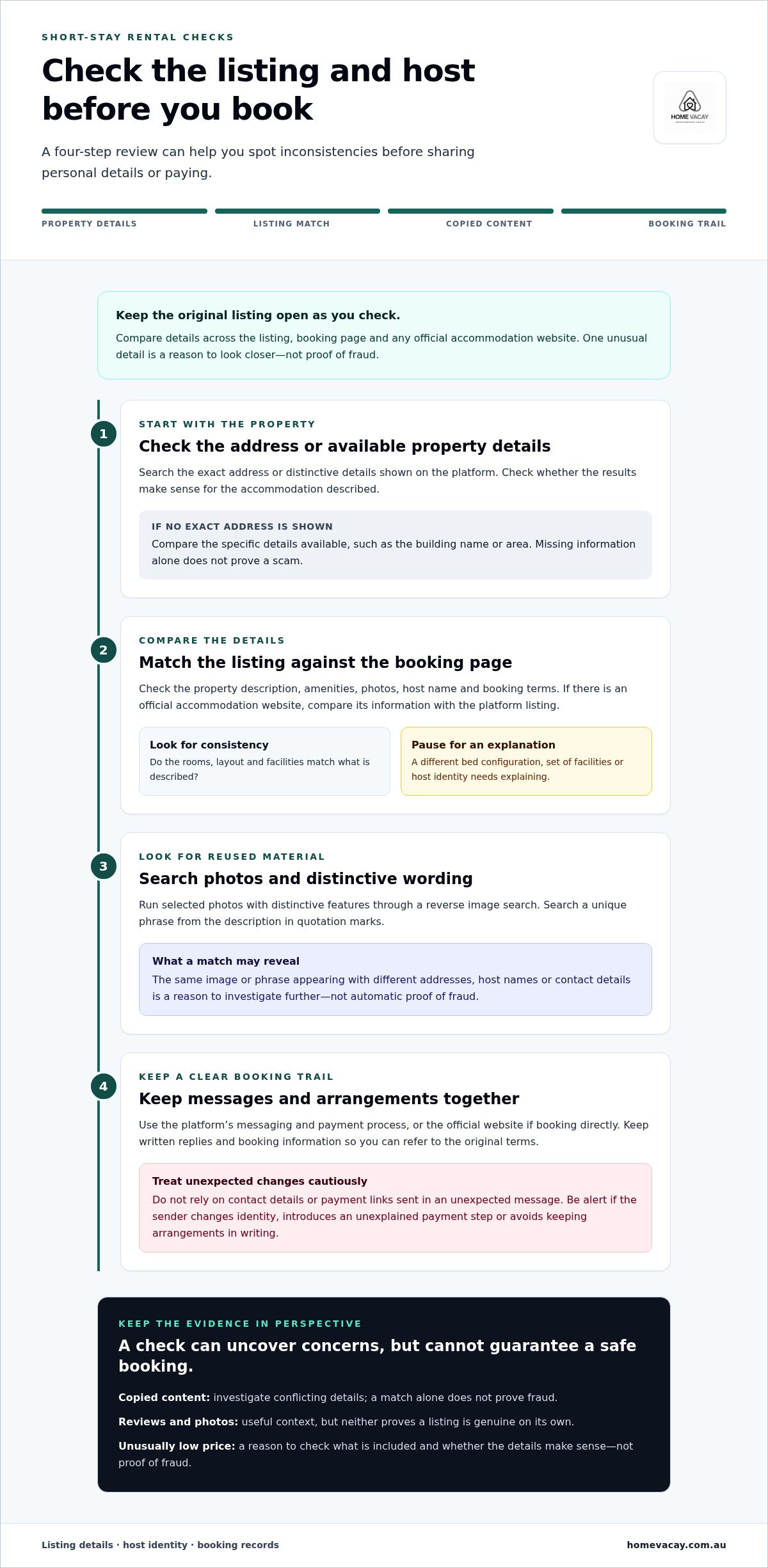
A structured check helps you compare what’s being offered with details you can verify. To avoid short term rental scams online, keep the original listing open and work through these steps before sharing personal details or paying.
- 1. Start with the exact listing address or property details shown on the platform. Search the address or distinctive property details independently. Check whether the results make sense for the accommodation described. If the listing doesn’t provide an exact address before booking, compare the specific details it does show, such as the building name or area. Missing information alone doesn’t prove a scam.
- 2. Compare the listing with the official booking page. Check the property description, amenities, photos, host name and booking terms. If you find an official website for the accommodation, compare its information with the platform listing. A different bed configuration, set of facilities or host identity needs an explanation.
- 3. Search for copied content. Use a reverse image search on selected listing photos and search a distinctive phrase from the description. Exact matches on other sites can reveal reused material or conflicting contact details. Treat a match as a reason to investigate further, not automatic proof of fraud.
- 4. Keep the conversation and booking together. Use the platform’s messaging and payment process, or the official website if booking directly. Don’t rely on contact details or payment links sent in an unexpected message. Save written replies and booking information so you can refer to the original terms.
Searches and comparisons can reveal inconsistencies, but no check guarantees a booking is safe. The FTC guide to avoiding rental scams also recommends checking listing details and being alert to requests that move payment away from the original booking process. Use it as a reference alongside the rules of the platform or website you’re using.
How can you check whether rental photos or descriptions have been copied?
Choose a few photos with distinctive features and run them through a reverse image search. Look for the same images attached to different addresses, host names or descriptions. You can also search a unique phrase from the listing in quotation marks. Reused content may have an innocent explanation, but conflicting property details or contact information call for closer scrutiny.
What should you check in host details and booking communication?
Check that the host name, property details, contact information and booking terms remain consistent from listing to confirmation. Ask a practical question, such as which amenities are included, and see whether the answer is clear and matches the listing. Be cautious if the sender changes identity, introduces an unexplained payment step or avoids keeping arrangements in writing.
For a direct booking, compare the listing details with the self-contained apartment stays on the Home Vacay website. Keep the reservation information in one place so you can refer to it easily.
Short-term rental payment requests: how to tell a red flag from a normal step
Payment is a key point to pause and check. A request can look routine while changing the booking path or where your money goes. To avoid short term rental scams online, compare the request with the payment steps and terms shown by the original platform or official booking website.
| Ordinary booking step | Request to examine closely |
|---|---|
| You pay through the booking service or official website you chose. | You’re asked to pay through private messages, a separate link or an unrelated website. |
| The amount, payment timing and cancellation terms match the booking details. | The amount or terms change unexpectedly, or the reason for the change is unclear. |
| Payment instructions remain consistent with the booking confirmation. | New bank details or payment instructions arrive at the last minute. |
| You receive a written confirmation and a payment record. | You’re asked to transfer money quickly, keep the arrangement secret or use an unusual transfer method. |
Moving payment away from the original booking path can make the transaction harder to connect to your reservation and may affect what help the platform can provide. The FBI warnings on rental fraud explain why it’s important to be cautious with payment instructions. Read the terms of the service you’re using, as payment processes and available protections vary. No payment method is completely safe.
Is it safer to pay through the booking website?
Keeping payment within the service where you made the booking can make it easier to match the transaction to your reservation. A private message or separate payment link may take you outside that record and the service’s usual process. Before paying, check that you’re on the correct platform or official website, then review its payment, cancellation and dispute terms.
What payment requests should make you pause?
Stop before acting on a last-minute change to bank details or payment instructions. Verify it using the contact method shown on the original platform or official website, not by replying to the unexpected message. Urgency, secrecy and unusual transfer requests are reasons to slow down. Don’t send identity documents or payment details through an unexpected link or channel.
Before completing payment, check the total, when payment is due, the cancellation terms and how you’ll receive confirmation. If any part doesn’t match the booking you intended to make, pause and resolve the inconsistency through the original booking path.
A safe short-term rental booking checklist from search to check-in
Good record-keeping makes it easier to spot changes and find the right details while you travel. Keep one set of records from your first search through to arrival. This supports avoiding short term rental scams online and gives you a clear reference if a message or instruction doesn’t match what you agreed to.
Before booking
- Save or note the listing details, including the property description, amenities, dates and host name.
- Review the total payment, timing, cancellation terms and booking process before proceeding.
- Keep questions and replies in the platform or official website where you plan to book.
After confirmation
- Save the booking confirmation and reference, confirmed dates, agreed terms and payment receipt.
- Keep written host communication with the booking records. Preserve messages in their original format where possible, including timestamps.
- Store copies somewhere you can access while travelling, such as a secure email or device folder. Keep essential details available in case you can’t get online.
Before arrival
- Compare check-in instructions with the original confirmation. Check the property details, arrival arrangements and any stated requirements.
- Use the original platform or official website communication channel if you need to clarify something.
- If instructions or contact details change unexpectedly, pause. Find the official contact route independently instead of relying only on the new message.
What should you save after confirming an online rental booking?
Keep the listing, booking confirmation, payment receipt and written communication together. The listing records what was advertised, the confirmation shows what you booked, and the receipt helps match payment to the reservation. Preserve original messages rather than relying only on handwritten notes or screenshots without context. Keep dates and timestamps so the order of events is clear.
What should you do if check-in details do not match?
Don’t act on a new instruction until you’ve compared it with your confirmation. Contact the booking service through its original channel, or use contact information you locate independently from the official website. Don’t provide extra payment or identity information in response to an unexplained change. Keep a copy of the message and reply for your records.
For a direct booking, keep the details shown on the Home Vacay website with your confirmation, so your reservation information is easy to refer to as you plan your stay.
Suspect a short-term rental scam? Take these steps and book with confidence
If a listing, payment request or arrival message doesn’t feel right, pause before taking another step. Staying calm can help limit further exposure and keep a clear record of what happened. These steps support avoiding short term rental scams online, whether you’ve received a suspicious message or already paid.
- Stop further payments. Don’t send more money or follow new payment instructions until you’ve checked them through the original booking service or an independently found official contact route.
- Preserve the evidence. Save the listing, messages, booking confirmation, receipts, transaction records and relevant contact details. Keep original emails or message records, including dates and times, where possible.
- Contact the booking service. Report the listing or message through the platform or official website used for the reservation. Follow its instructions and keep a record of your report.
- Contact your payment provider promptly. If you paid or shared payment details, explain what happened and ask what options apply to that transaction. Follow the provider’s instructions. Don’t assume a payment can be reversed or recovered.
- Report the incident in Australia. You can report a suspected scam to Scamwatch. A report helps authorities understand scam activity, but doesn’t guarantee you’ll recover money. If the matter involves online criminal activity, see ReportCyber guidance on reporting cybercrime.
What should you do after paying a suspicious rental host?
Gather the listing details, host or sender information, messages, receipts and transaction records. Contact your bank, card issuer or other payment provider as soon as you can, using contact details you find independently. Ask what steps apply to your payment and whether you should take any further action. Report the incident through the relevant booking service and Australian reporting channels. Recovery isn’t assured, so keep records of every report and response.
How can you choose a clearer booking path next time?
Use the official website or booking platform for your reservation, and keep the listing, booking terms and confirmation together. Before confirming, make sure the property description, payment details and arrival information are clear and consistent. A direct booking path gives you one place to review the accommodation information and reservation details.
For your next stay, browse the self-contained apartments on the official Home Vacay website and review the booking information there.
Book your next stay with a clearer plan
A calm booking starts with checking that the property details, host information and payment instructions are consistent. Keep communication and payment within the platform or official website you’re using, and save your confirmation and receipts where you can find them. If a request or arrival instruction changes unexpectedly, pause and verify it through an independently located official contact route.
Avoiding short term rental scams online isn’t about treating every unusual detail as proof of fraud. It’s about noticing patterns, taking time to check them and knowing what to do if something feels wrong. If you’ve already shared payment details, contact your payment provider promptly and follow its guidance.
When you’re ready to plan a business or leisure stay, Home Vacay offers self-contained apartments with direct booking through its website. Explore Home Vacay stays and review the listing and booking information at your own pace. A few considered checks can help you book with greater confidence.
Frequently Asked Questions
How can I tell if a short-term rental listing is a scam?
Look for several details that don’t line up, rather than relying on one clue. Compare the property description, amenities, photos, host name and booking terms across the listing and official booking page. Be cautious if the host pressures you to act quickly, avoids practical questions or asks you to pay through an unexpected channel. These checks can help with avoiding short term rental scams online, but no single sign proves a listing is fraudulent.
Is it safe to book a short-term rental directly with the host?
Direct booking can be legitimate, but it isn’t automatically safe or unsafe. Make sure you’re using the host’s official website or a contact route you found independently, and check that the property details and booking terms are clear. Review how payment and confirmation work before proceeding. Keep written communication, the booking confirmation and payment record together. A direct booking path doesn’t guarantee a scam-free transaction, so pause if details conflict.
Can rental scam photos be checked with a reverse image search?
Yes. A reverse image search can help you find out whether selected property photos appear elsewhere online. Compare any matches for differences in the address, host name or description. You can also search a distinctive phrase from the listing to find duplicate wording. A match doesn’t prove a scam, since images may be reused legitimately. Treat conflicting details as a reason to investigate further and compare information through the original booking channel.
What should I do if I have paid a fake holiday rental host?
Stop sending money, save the listing, messages, receipts and transaction records, then contact your bank or payment provider promptly. Ask what options apply to that transaction and follow its instructions. Report the suspected scam to the booking service and to Scamwatch in Australia. If online criminal activity is involved, consult ReportCyber’s reporting guidance. Keep records of your reports and any replies. Reporting can help inform authorities, but it doesn’t guarantee you’ll recover your money.
Are unusually cheap short-term rentals always a scam?
No. A low price alone doesn’t prove that a rental is fraudulent, but it is a reason to check the listing more closely. Compare what’s included, the property details, dates and booking terms with information on the official booking page. Be more cautious if the price seems out of step with the offer and the host also uses urgency, gives vague answers or provides unexplained payment instructions. Consider the full pattern before deciding whether to proceed.
What happens if a rental host asks me to pay outside the booking platform?
Pause and check the request against the booking service’s payment terms before sending anything. Paying through private messages or a separate link can make it harder to connect the transaction to your reservation and may affect what help the platform can offer. Contact the service through its original channel if the request is unexpected. Don’t follow new payment instructions or share financial details until you’ve verified them independently.


